


For 3D sensors, as with any image acquisition device, proper exposure is critical for acquiring accurate and complete data –– especially when that device is being used to scan different surface textures in a fast-moving inline inspection environment.
Incorrect exposure settings will result in poor sensor operation and missing or inaccurate data. Here are some examples of different exposure settings for a profile (laser line based sensor) and the results they produce:
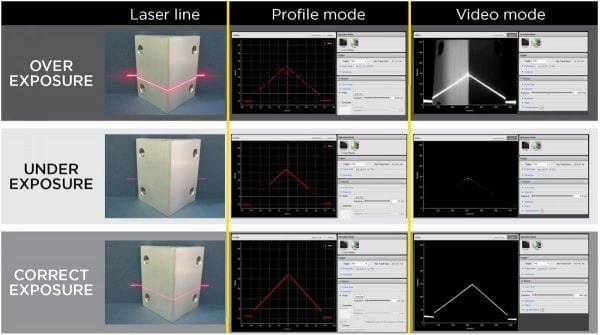
Overexposure results in errors in data. Underexposure provides incomplete or possibly no data at all. Correct exposure delivers the desired result, but requires “smart selection” when scanning varying features on different scan targets.
Requirements for setting correct exposure can vary from application to application. Factors that affect exposure settings include object surface texture and color, and particularly how these features vary between the surfaces being measured.
When choosing a 3D sensor, users should find out if it is able to provide correct exposure under all applications. Today’s 3D sensors may provide a selection of methods to set proper exposure such as those described below:
Single Exposure Setting
For applications where the object surface texture and color do not change for all targets, setting a single optimized exposure (the same exposure in every scan) will ensure proper sensor operation.
In such cases, the sensor must enable the user to set the illumination power, adjust the imager integration time, or control both. 3D smart sensors provide this ability to automatically control both for simple setup.
To ensure that exposure is set correctly, it is also important that a 3D sensor has a means to display a live video image of the surface and the projected light pattern on the surface. This video mode is also useful to identify any stray light or ambient light issues that may affect sensor operation.
Another useful tool available in 3D smart sensors is an auto set exposure function where the sensor itself sets the optimized exposure.
Multiple Exposure Setting
For surfaces with varying color or texture (e.g., white and black), a sensor with multiple exposure capability is required. Data from the multiple exposures is automatically combined into a single complete 3D profile.
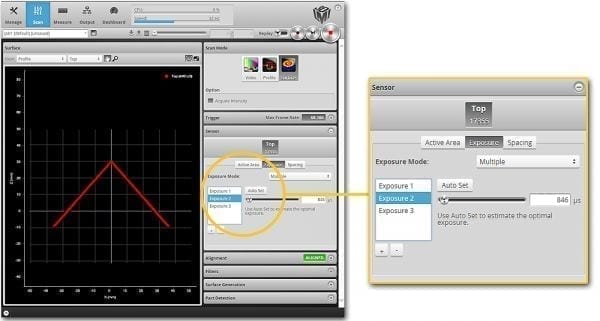
Dynamic Exposure Setting
In some applications, surface texture or color may continuously vary over time. The solution for these applications is found in dynamic exposure control. With dynamic exposure control, the sensor uses data from past exposures to continuously update exposure settings, adapting automatically to emerging surface changes.
Conclusion
Setting the proper exposure will provide a ‘clean’ 3D point cloud that accurately represents the shape of the scanned object.
For flexibility, a 3D sensor should provide a selection of methods to set and control exposure. Today’s 3D smart sensors have a selection of exposure control capabilities built into the sensor itself, with no external software or hardware required.