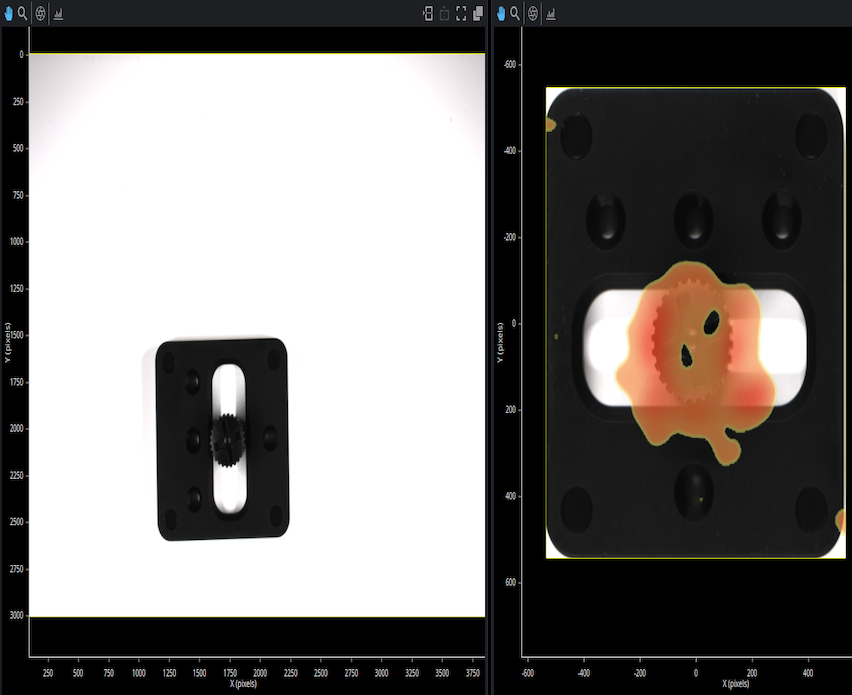
In this scenario, you will create an image pattern of the mounting plate to ensure orientation-independent processing. Next, measure the part’s dimensions to crop it from the background. Finally, input the cropped image into an anomaly detector to identify defects.
Tools: Surface Anomaly Detector1776, Surface Part Detection1775
File Type: .zip
File Size: 1.1 GB
Date: January 23, 2025
In this scenario, you will detect defects on the surface of a bevel gear by training an AI model using the Surface Anomaly Detector tool. To evaluate this scenario, you will need the GoPxL Pro Utilities (1.2 or later) on a PC, or a GoMax.
Follow the steps below to load the scenario:
1. Download the example provided and uncompress this in a local drive.
2. Launch GoPxL on PC, or connect the GoMax, access the support page and open the .gpsup support file in the archive.
3. From the loaded job file, access the Surface Anomaly Detector tool configuration and press the Train button.
4. On the project page, upload the .gpproj file included in the archive, then exit the wizard.
5. Return to the Surface Anomaly Detector tool and select a model then review the results on the recorded data.
In this scenario, you will detect defects on the surface of a tire by training an AI model using the Surface Anomaly Detector tool. To evaluate this scenario, you will need a GoMax NX, GoMax ORIN or GoMax ORIN+ with GoPxL 1.1.52.14 or newer installed.
Follow the steps below to load the scenario:
1. Download the example provided and uncompress this in a local drive.
2. Connect to GoPxL on GoMax, access the top-right replay interface and open the .gprec file in the archive.
3. From the loaded jobfile, access the Surface Anomaly Detector tool configuration and press the Train button.
4. On the project page, upload the .gpproj file included in the archive, then exit the wizard.
5. Return to the Surface Anomaly Detector tool and select a model and review the results on the recorded data.
In this scenario, you will locate foreign debris on a paper towel by training an AI model using the Surface Anomaly Detector tool. To evaluate this scenario, you will need a GoMax NX, GoMax ORIN or GoMax ORIN+ with GoPxL 1.1.52.14 or newer installed.
Follow the steps below to load the scenario:
1. Download the example provided and uncompress this in a local drive.
2. Connect to GoPxL on GoMax, access the top-right replay interface and open the .gprec file in the archive.
3. From the loaded jobfile, access the Surface Anomaly Detector tool configuration and press the Train button.
4. On the project page, upload the .gpproj file included in the archive, then exit the wizard.
5. Return to the Surface Anomaly Detector tool and select a model and review the results on the recorded data.
In this scenario, you will detect defects on the surface of a golf ball by training an AI model using the Surface Anomaly Detector tool. To evaluate this scenario, you will need a GoMax NX, GoMax ORIN or GoMax ORIN+ with GoPxL 1.1.52.14 or newer installed.
Follow the steps below to load the scnenario:
1. Download the example provided and uncompress this in a local drive.
2. Connect to GoPxL on GoMax, access the support page and open the .gpsup support file in the archive
3. From the loaded jobfile, access the Surface Anomaly Detector tool configuration and press the Train button.
4. On the project page, upload the .gpproj file included in the archive, then exit the wizard.
5. Return to the Surface Anomaly Detector tool and select a model and review the results on the recorded data.
In this scenario, you will measure the height of semiconductor wafer ball bumps using scan data from a Gocator 4020 coaxial line confocal sensor and Surface Plane, Surface Position, Surface Transform, Surface Dimension, and Feature Dimension tools.
In this scenario, you will perform measurements on the teeth angles of a metal automotive gear using sample data from a Gocator 2640 laser line profiler and the Surface Bounding Box, Surface Mask, Surface Plane, Surface Transform, Surface Edge, and Feature Intersect tools.